

When you want to replace a legendary wired gaming mouse or upgrade your setup based on actual research, you need a clear breakdown of the market. I have compared these five options by analyzing buyer feedback so you do not have to guess. In my view, the original hype surrounding the Finalmouse Air58 still casts a long shadow over the entire category. Let us see how these contenders rank against each other.
Unlock Prime member deals all year. Join free today.
Start a free 30-day Amazon Prime trial to unlock members-only deals, free fast delivery, and Prime Video.
Try Amazon Prime Free
$14.99/month (plus tax) after trial. Cancel anytime. We may earn a commission if you sign up.
1. Finalmouse x Ninja Air58 - Cherry Blossom Red Weighs Only 58 Ounces Ultralight
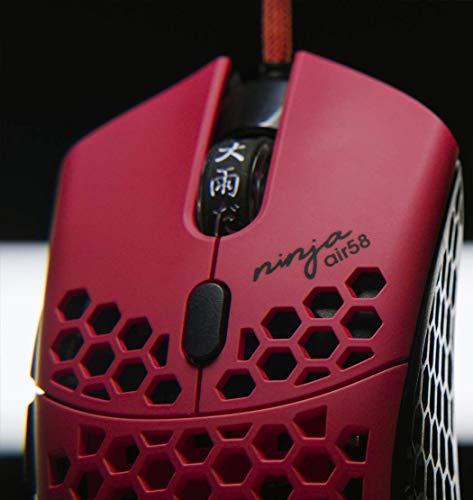
It earned its top ranking entirely through its iconic cultural status and a featherlight 58 gram weight that shaped an entire generation of peripheral design. I'd rank this first because the distinctive cherry blossom red aesthetic and honeycomb shell created a collector frenzy that few other brands have ever managed to replicate.
But you should know that finding an authentic, working unit requires wading through a notoriously volatile secondhand market. In my opinion, the lack of modern warranty support makes this a risky purchase for casual users. Collectors will love it, but practical gamers might want to look elsewhere.
Buyers frequently praise the ultra-lightweight feel for competitive aiming.
The primary drawback mentioned in community spaces is the steep aftermarket price tag.
Fans of the collaboration consider the distinct colorway a centerpiece for any desk setup.
Get It From Amazon Now: Check Price on Amazon & FREE Returns
2. Compatible for Finalmouse Air58 / Ninja/Ultralight Mouse Skates Pads Slipping Improvement
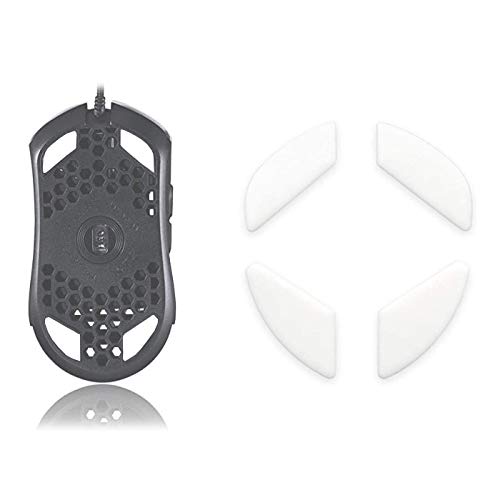
This maintenance accessory is built specifically for owners and restorers who need to breathe new life into worn-out peripheral glide feet. If your original mouse feet are dragging or scratching against your desk pad, this simple replacement set is essential for restoration.
I think replacing your skates is the single best way to restore that factory-fresh glide without buying a whole new device. Just remember that applying aftermarket feet requires a steady hand and careful cleaning of the old adhesive residue.
Reviewers note that these replacement pads restore smooth gliding performance.
Users appreciate the exact fit tailored for the original Air58 dimensions.
Applying the new adhesive requires patience to ensure proper alignment.
Get It From Amazon Now: Check Price on Amazon & FREE Returns
3. Logitech G PRO 2 LIGHTSPEED Ambidextrous Wireless Gaming Mouse - Magenta | Symmetrical design, <4 customizable magnetic side buttons, USB-C charging, PowerPlay Wireless Charging Supported, For PC/Mac

The most interesting feature here is the modularity of the customizable magnetic side buttons, which let you swap between ambidextrous layouts on the fly. Widen out from that clever engineering, and you get a thoroughly modern wireless flagship built for uncompromising performance.
I'd point most competitive players toward this option because it abandons fragile wired cords for lag-free LIGHTSPEED wireless technology. My only real hesitation is the higher price point, which might deter budget-conscious shoppers.
Buyers highlight the dependable wireless connection and long battery life.
The symmetrical shape receives praise for accommodating various grip styles.
Some users report needing custom software to fully configure the side buttons.
Get It From Amazon Now: Check Price on Amazon & FREE Returns
4. SEUNKWANG EWEAND X23 Pro Gaming Mouse, Tri-Mode 2.4G/USB-C/Bluetooth Wireless Mouse, PAW3311 Sensor, 12,000 DPI, 59g Lightweight, 1ms Ultra-Low Delay, Gaming & Computer Mouse for Laptop/PC/Mac-Pink

The most common buyer complaint centers on the lesser-known brand name, which often makes shoppers hesitate before adding it to their cart. Give it a closer look, however, and you will find a remarkably capable tri-mode wireless mouse that punches well above its weight class.
I find the inclusion of a reliable PAW3311 sensor quite impressive for a lightweight shell that sits at just 59 grams. It offers a compelling alternative for anyone who wants modern features without paying flagship prices.
Users frequently mention the convenience of switching between Bluetooth and 2.4G connections.
The lightweight construction draws positive comparisons to much more expensive peripherals.
A few buyers note that the accompanying software interface can feel unintuitive.
Get It From Amazon Now: Check Price on Amazon & FREE Returns
5. SOLAKAKA SM900 Gaming Mouse Wired with RGB,Adjustable 12800 DPI Wired Gaming Mouse with Side Buttons,Computer Mouse for Laptop/PC,White

Stepping down from the wireless freedom of the X23 Pro, this wired option takes a much more traditional approach to desktop peripherals. It relies on a tethered USB connection to deliver stable inputs, making it a reliable pick for budget wired setups.
I think the adjustable 12800 DPI sensor offers plenty of sensitivity range for everyday tasks and casual gaming sessions. You do miss out on the cutting-edge weight reduction found on higher-end models, but the price reflects that compromise.
Buyers often highlight the value for money as its strongest selling point.
The integrated RGB lighting adds a nice aesthetic touch for basic desktop builds.
Some users mention that the braided cable feels a bit stiff out of the box.
Get It From Amazon Now: Check Price on Amazon & FREE Returns
Choosing Between Them
When building out your desk space, choose the Finalmouse x Ninja Air58 if you are a dedicated collector who values iconic design over modern convenience. For everyone else, the lineup splits cleanly between the maintenance needs of restorers, the premium wireless performance of the Logitech G PRO 2, and the budget-friendly practicality of the wired and wireless alternatives. I would strongly steer everyday competitive players toward the modern wireless options instead of chasing nostalgic hardware.
Remember that hunting down discontinued collector items always involves navigating a secondhand market with extreme care. Prices fluctuate wildly, and verifying seller authenticity requires patience to avoid counterfeit units. Keep your actual performance needs in mind so you end up with a tool that serves your daily workflow rather than just sitting on a shelf.
As an Amazon Associate, this site earns from qualifying purchases. Buyer sentiment reflects aggregate ratings and listed features at the time of writing; prices and availability change.

James Morris is a product researcher and writer who tests everyday products hands-on to create honest, practical reviews and buying guides. At NorseNames, he covers home and kitchen, electronics, health and wellness, outdoor gear, and more — comparing real products side by side so readers can choose with confidence.
