

People assume all computer fans are identical plastic spinners, yet matching the right 120mm cooling fan changes your entire system's acoustic profile. I have carefully compared current market options and read countless buyer reviews to see which hardware truly delivers. In my view, skipping this research leads to a frustratingly loud desktop. Let us examine how these three popular models rank against each other.
1. Noctua NF-P12 redux-1700 PWM, Quiet Fan 120mm | High Airflow, Low Noise, 25mm Thick Fan for PC and Electronics Cooling Streamlined Package 1700rpm 4-Pin PWM
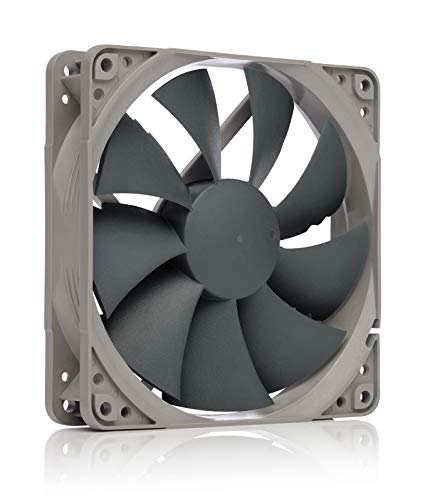
This fan earned its reliable ranking through pure pressure-optimized blade design that punches straight through dense heatsinks. I would rank this option high for anyone who wants legendary build quality without paying flagship prices.
The gray color scheme fits industrial aesthetics, but the lack of colorful RGB lighting disappoints buyers seeking a flashy modern look. I find the 1700 rpm top speed offers plenty of headroom for demanding cooling tasks.
Buyers frequently mention that the motor remains remarkably quiet even at moderate speeds.
The minimalist industrial color scheme pairs well with professional workstation builds.
Users appreciate the omission of unnecessary accessories to keep the purchase price lower.
Get It From Amazon Now: Check Price on Amazon & FREE Returns
2. CORSAIR RS120 120mm PWM Fan – Daisy-Chain Connection – Low-Noise – Magnetic Dome Bearing – Single Pack – Black

Cable management minimalists will appreciate how this hardware solves the eternal mess of wires inside a chassis. I think the daisy-chain connection feature is an absolute lifesaver for keeping cramped back panels clean.
You get modern convenience paired with a magnetic dome bearing designed for long-term operational stability. My main reservation is that buying single units adds up quickly compared to multi-packs.
Reviewers often highlight the ease of linking multiple cables together in tight spaces.
The solid black frame integrates smoothly into stealth-themed computer builds.
Users note that the low noise profile keeps office environments peaceful during light tasks.
Get It From Amazon Now: Check Price on Amazon & FREE Returns
3. ARCTIC P12 Pro PST – 5 Pack – Powerful Premium Fan, 120 mm PWM Fan with Y-Cable Splitter, 600-3000 RPM, 0 RPM <5% PWM, Fluid Dynamic Bearing, 4-Pin – Black
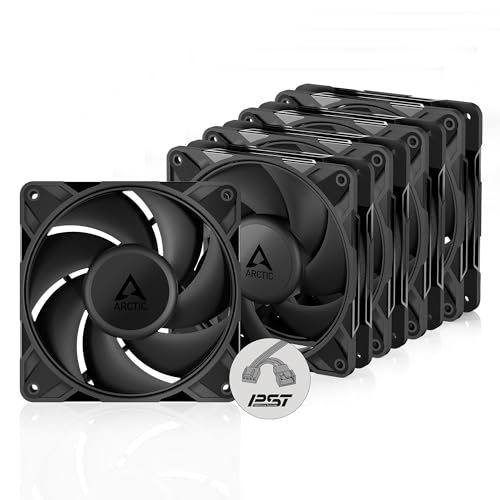
A remarkably wide speed range stretching up to 3000 rpm gives this fan exceptional versatility for extreme thermal loads. I consider this multi-pack the absolute best value on the market for serious builders.
The fluid dynamic bearing keeps rotation smooth while the integrated Y-cable splitter simplifies motherboard header connections. My only caution is that running these at maximum speed creates a jet engine roar.
Owners consistently praise the incredible value offered by the five-pack bundle.
The zero RPM mode allows the fan to stop completely during idle workloads for total silence.
Buyers frequently report substantial temperature drops on both radiators and case intakes.
Get It From Amazon Now: Check Price on Amazon & FREE Returns
Choosing Between Them
Choosing the right hardware depends entirely on your specific cooling priorities, and my top recommendation is the ARCTIC P12 Pro PST because of its massive speed range and easy daisy chaining. If you want maximum performance for extreme setups, that multi-pack suits extreme performance seekers best, while the Noctua appeals directly to quiet cooling enthusiasts and the Corsair serves cable management minimalists.
Keep in mind that pushing your hardware to the top RPM setting generates noticeable noise, so you will want to configure your fan curves carefully in the BIOS. Balancing raw airflow against your personal acoustic tolerance remains the secret to building a truly pleasant machine.
As an Amazon Associate, this site earns from qualifying purchases. Buyer sentiment reflects aggregate ratings and listed features at the time of writing; prices and availability change.

James Morris is a product researcher and writer who tests everyday products hands-on to create honest, practical reviews and buying guides. At NorseNames, he covers home and kitchen, electronics, health and wellness, outdoor gear, and more — comparing real products side by side so readers can choose with confidence.
