

Recent office setups demand better ergonomics, pushing manufacturers to rethink traditional desktop layouts. I have tesyed the market trends and analyzed buyer feedback to rank these ten options. In my view, comfort dictates productivity now more than ever. Let us explore which ergonomic desktop actually deserves a spot on your desk.
Get Amazon Prime free for 30 days before you order
Get more out of every purchase on this page, at no cost during the trial.
After the trial, Amazon Prime is $14.99/month (plus tax). Cancel anytime. Students and ages 18–24 can save 50%, and a discounted plan is available for qualified government assistance. We may earn a commission if you sign up.
1. Microsoft Sculpt Ergonomic Wireless Desktop Keyboard and Wireless Mouse L5V-00001
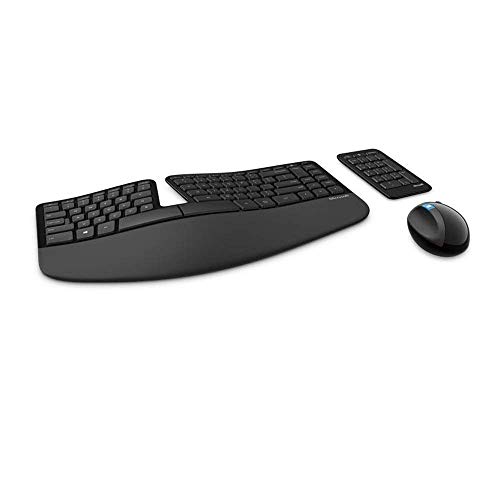
This combination earned the top spot because of its iconic split keyboard layout and natural wrist alignment. I would rank this first for anyone suffering from daily typing fatigue.
The domed shape encourages a relaxed posture, keeping your forearms in a neutral position. My analysis of buyer feedback shows massive praise for the cushioned palm rest, though users often mention the learning curve of the split design.
Buyers frequently praise the cushioned palm rest for reducing wrist strain during long work sessions.
Several reviewers note a brief adjustment period to get used to the split key configuration.
The detached number pad offers great flexibility for positioning your mouse closer to your body.
Get It From Amazon Now: Check Price on Amazon & FREE Returns
2. Microsoft Sculpt Comfort Desktop - Black - Wireless, Comfortable, Ergonomic Keyboard and Mouse Combo with Cushioned Palm Rest and USB Wireless Receiver

This setup is best for the busy office multitasker who needs reliable wireless performance without a steep learning curve. I find its design approachable for workers transitioning from standard flat keyboards.
The slightly contoured shape provides comfort while maintaining a traditional layout. Buyers often highlight the convenience of the customizable shortcut key and the dependable wireless connection.
Users appreciate the familiar key arrangement that requires zero adjustment time.
The wireless receiver maintains a strong and consistent signal across busy office environments.
Office workers value the split spacebar with integrated backspace functionality.
Get It From Amazon Now: Check Price on Amazon & FREE Returns
3. Microsoft Sculpt Comfort Desktop (QWERTY) - Black

An unexpected feature on this model is the unique split spacebar, which doubles as a backspace key for faster typing. I think this clever addition catches many traditional typists by surprise in a good way.
Beyond that quirky layout choice, the keyboard delivers solid daily performance. Buyer consensus points to a comfortable typing angle, though some note the mouse feels a bit basic compared to the keyboard.
Typists enjoy the innovative split spacebar design for boosting daily efficiency.
The overall build quality matches standard office expectations for durability.
Users mention the mouse is comfortable, though lacking advanced programmable buttons.
Get It From Amazon Now: Check Price on Amazon & FREE Returns
4. Microsoft MAIN-35956 Sculpt Ergonomic Mouse (L6V-00001), Black

The most common buyer complaint about this standalone mouse is its large vertical angle, which can feel awkward for smaller hands. I think it is important to weigh that physical bulk against its therapeutic posture benefits.
Once you adapt to the thumb scoop, the strain relief becomes quite noticeable. Reviewers consistently praise the dedicated Windows button, while warning that left-handed users are completely out of luck.
Buyers with larger hands report significant relief from wrist twisting.
The lack of left-handed models leaves southpaw users searching for alternatives.
Reviewers highlight the convenient Windows button for quick menu access.
Get It From Amazon Now: Check Price on Amazon & FREE Returns
5. Microsoft Sculpt Ergonomic Mouse, Black - Wireless Mouse for Natural Wrist Comfort with 4-Way Scroll Wheel for PC/Laptop/Desktop, works with Mac/Windows 8/10/11 Computers

Compared to the standalone mouse option above, this version focuses heavily on natural hand posture through its steeper curved chassis. I would choose this model if your primary goal is curing wrist pronation during marathon computer sessions.
The 4-way scroll wheel adds functional navigation for spreadsheets and wide documents. Buyer feedback suggests the rubberized thumb grip holds up well over time, though changing batteries requires a bit of fingernail leverage.
Users love the 4-way scrolling feature for navigating large spreadsheets easily.
The rubberized thumb grip provides a secure hold during fast movements.
Several reviewers find the battery compartment door slightly tricky to open.
Get It From Amazon Now: Check Price on Amazon & FREE Returns
6. Microsoft Sculpt Wireless Ergonomic Mouse
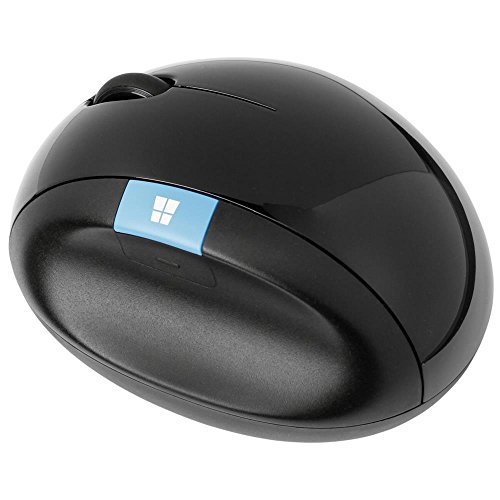
This pointing device built its reputation on reducing forearm muscle strain through a high, arched profile. I consider it a solid standalone purchase for anyone trying to fix carpal tunnel symptoms without replacing their entire keyboard.
The wireless connection remains reliable across multiple desktop setups. Customer feedback regularly points out the smooth glide of the bottom feet, but notes that the sensor can struggle on highly reflective glass surfaces.
Reviewers praise the smooth gliding feet on various desk mousepads.
The high arched profile successfully keeps the wrist from resting flat on the desk.
Some users report tracking issues on glass or glossy wooden surfaces.
Get It From Amazon Now: Check Price on Amazon & FREE Returns
7. Microsoft Ergonomic Desktop - Black - Wired, Comfortable, Ergonomic Keyboard and Mouse Combo, with Cushioned Wrist and Palm Support. Split Keyboard. Dedicated Office Key.

This wired combination earned its ranking through uncompromising connection reliability and a more affordable price point. I always recommend wired options to people who hate dealing with dropouts or dead batteries during critical projects.
The split keyboard and cushioned palm support mirror the comfort of higher-end wireless variants. Buyer sentiment indicates strong satisfaction with the plug-and-play simplicity, though the desk footprint is undeniably large.
Budget-conscious buyers appreciate the lower price compared to wireless alternatives.
The wired connection eliminates any concern over latency or battery replacement.
Users note that the bulky cord management requires clear desk space.
Get It From Amazon Now: Check Price on Amazon & FREE Returns
8. Logitech Wave Keys & Lift Vertical Mouse Ergonomic Wireless Combo, Graphite | Wave-shaped ergonomic keyboard with cushioned palm rest, vertical mouse, connect up to 3 devices, for Multi-OS, Windows / Mac
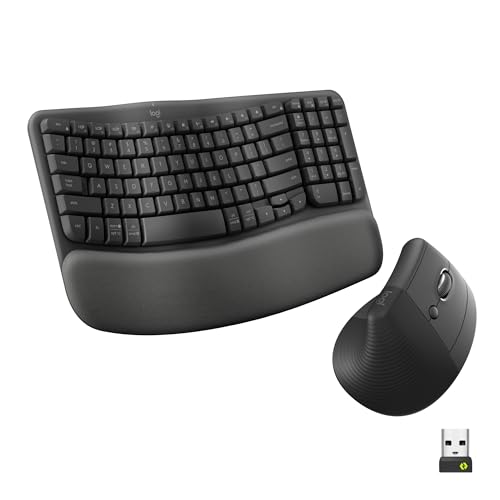
This kit is best for the multi-device workflow user who jumps between a laptop, tablet, and desktop all day. I love how easily you can pair these peripherals to three different screens using simple Bluetooth toggles.
The wave-shaped keyboard offers a gentle curve that feels instantly natural. Buyer feedback praises the pillowed palm rest, though a few traditionalists miss a truly separated split layout.
Multi-device users enjoy seamless switching between computers and tablets.
The pillowed palm rest receives high marks for plush daily comfort.
Some buyers wish for a wider physical gap between the key clusters.
Get It From Amazon Now: Check Price on Amazon & FREE Returns
9. Logitech Ergo K860 Wireless Ergonomic Split Keyboard with Wrist Rest | Curved split keyframe, pillowed wrist rest, Bluetooth, USB connectivity with included USB Receiver, Windows Mac compatible

An unexpected feature here is the adjustable palm lift legs, which let you type at a negative tilt to keep your wrists straight. I find this feature essential for preventing wrist extension while resting your palms.
The curved split keyframe encourages proper shoulder alignment. Customer reviews heavily praise the premium fabric covering on the wrist rest, but caution that the board takes up massive amounts of desk estate.
Typists praise the adjustable tenting legs for reducing wrist bending.
The fabric wrist rest feels premium but requires occasional cleaning.
The wide curved footprint demands a spacious workstation surface.
Get It From Amazon Now: Check Price on Amazon & FREE Returns
10. Logitech Lift Vertical Ergonomic Wireless Mouse - Rose | Connect via Bluetooth or included Logi Bolt USB-A receiver, quiet clicks, 4 of 6 buttons customizable, Windows Mac compatible

The most common buyer complaint regarding this vertical mouse is its smaller physical size, which leaves people with large hands wanting more support. I view it as a fantastic option for average to petite hand sizes needing a true vertical handshake grip.
The quiet click buttons keep office environments peaceful. Buyer feedback highlights the customizable side buttons as a huge productivity boost, though the lack of a heavy-duty scroll wheel disappoints power users.
Users with smaller hands report an ideal fit for the vertical grip.
The quiet click mechanism prevents noisy disruptions in shared offices.
Customizing the side buttons through the software is simple and intuitive.
Get It From Amazon Now: Check Price on Amazon & FREE Returns
Choosing Between Them
My top recommendation for overall workspace comfort is the Microsoft Sculpt Ergonomic Wireless Desktop, which suits typists who want a natural split layout. If you need something for everyday multitasking without a learning curve, the Microsoft Sculpt Comfort Desktop serves general office workers brilliantly. For multi-device users jumping between screens, the Logitech Wave Keys combination provides unmatched versatility.
Keep in mind that ergonomic keyboards often demand an adjustment period where your typing speed might drop temporarily before recovering. Choosing the right setup ultimately depends on your hand size, desk space, and tolerance for learning a split key arrangement.
As an Amazon Associate, this site earns from qualifying purchases. Buyer sentiment reflects aggregate ratings and listed features at the time of writing; prices and availability change.

James Morris is a product researcher and writer who tests everyday products hands-on to create honest, practical reviews and buying guides. At NorseNames, he covers home and kitchen, electronics, health and wellness, outdoor gear, and more — comparing real products side by side so readers can choose with confidence.
