

Most people assume that matching an M.2 drive to the wrong port simply slows your system down, but buying the wrong adapter will leave your hardware completely incompatible. I have carefully compared these options and read through extensive buyer feedback to separate the genuinely useful converters from the frustrating ones. In my view, understanding your exact protocol requirements is the only way to avoid an expensive mistake. Let us look at how these choices rank against each other.
Skip the shipping fees. Try Amazon Prime free for 30 days.
Enjoy free Same-Day, One-Day, and Two-Day delivery on millions of items, plus Amazon Prime Video and members-only deals all year round.
Try Amazon Prime FreeOnly $14.99/month (plus tax) after the trial. Cancel anytime. We may earn a commission if you sign up.
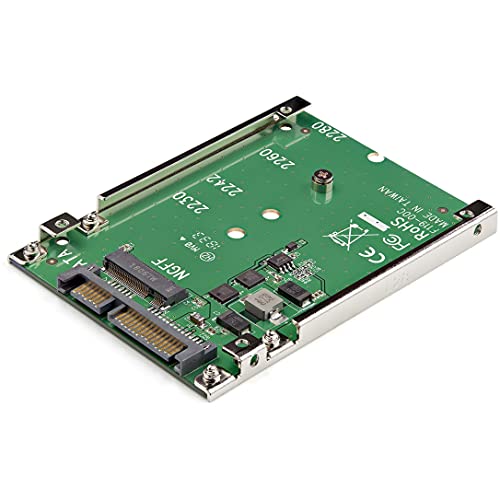 , Open-Frame Bracket, 7mm High, M2 Hard Drive Adapter - TAA" loading="lazy"]
1. StarTech M.2 PCIe NVMe to U.2 SFF-8639 Adapter, 2.5in, TAA (U2M2E125) | PCIe M.2 NVMe/AHCI SSD to 2.5in U.2 host adapter/converter, Up to 7.8GBps PCIe Gen 4, Not for SAS or SATA drives
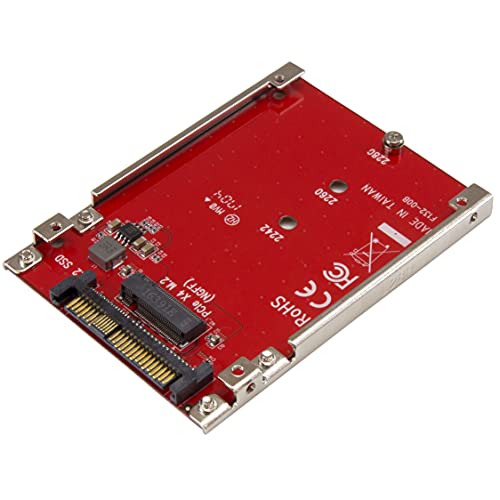
This enterprise adapter earned its top positioning through pure bandwidth performance, supporting rapid PCIe Gen 4 speeds up to 7.8GBps. In my view, it is the most reliable bridge for moving high-end storage into server environments where absolute data throughput matters most.
You should note that this unit is strictly built for NVMe drives, meaning it will completely ignore SAS or SATA protocols. I would advise checking your motherboard specifications twice before purchasing this specific model.
Users note that the build quality feels substantial and ready for server racks.
Buyers frequently mention the need for proper U.2 host connections to get the advertised speeds.
Several reviews highlight that this adapter does not work with standard consumer SATA drives.
Get It From Amazon Now: Check Price on Amazon & FREE Returns
2. M.2 NGFF to SATA3 Adapter, B+M Key SSD, No NVMe, Driver-Free | Convert SATA M.2 to Standard 2.5” SATA 6Gbps Drives; Fits 2230/2242/2260/2280 SSDs, Not Compatible with PCIe NVMe SSD
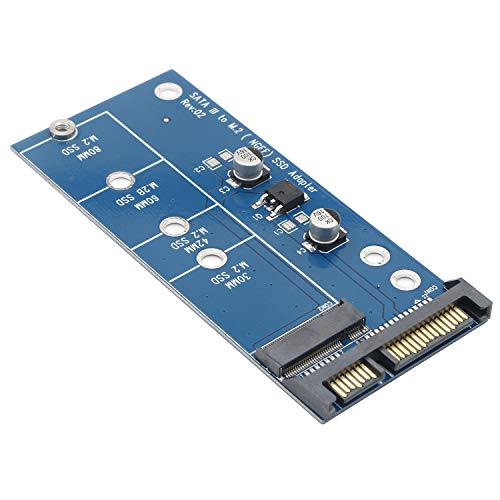
This converter is best suited for budget-conscious builders who need legacy SATA conversion for older M.2 B+M key drives. If you are breathing new life into an older laptop by swapping in an older SSD form factor, this is the exact tool for the job.
Buyers often appreciate that it requires zero drivers to function properly out of the box. I find this plug-and-play simplicity refreshing, though you must remember it cannot handle modern NVMe speeds.
Reviewers report that installation takes only a few minutes without software hassles.
Customers appreciate the standard 2.5-inch mounting holes that match traditional hard drives.
A common point in feedback is disappointment from buyers who accidentally purchased it for NVMe SSDs.
Get It From Amazon Now: Check Price on Amazon & FREE Returns
3. SSK M.2 NVME SATA SSD Enclosure, Improved RTL9210B Chip USB 3.2 Gen 2 10Gbps to PCI-E NGFF Adapter, M-Key/B+M Key External SSD Enclosure Aluminum Support UASP TRIM 2242/2260/2280

The standout feature here is the clever dual protocol support housed within a sleek aluminum body that handles both NVMe and SATA drives effortlessly. I rank this as my top overall pick because it transforms internal storage into fast external storage with incredible versatility.
The upgraded Realtek chip inside keeps thermal throttling to a minimum during large file transfers. In my opinion, this flexibility makes it an essential tool for anyone moving data between different machine types.
Buyers frequently praise the solid aluminum casing for keeping temperatures low during heavy usage.
Users highlight the convenience of using both NVMe and SATA drives in a single enclosure.
Reviewers note that the included cables are durable and support full USB 3.2 Gen 2 speeds.
Get It From Amazon Now: Check Price on Amazon & FREE Returns
4. ELUTENG M.2 to SATA Adapter - 2 in 1 Converter for MSATA/M.2 NGFF SSD to 2.5" SATA III, Supports B&M Key, Not for M Key

The most common buyer complaint about this dual format converter is the strict protocol limitation regarding M-key drives, which often confuses shoppers looking for universal compatibility. Despite that initial hurdle, it offers a clever way to bridge mSATA and M.2 NGFF drives into a standard SATA slot.
I think it fills a very specific niche for technicians hoarding older assorted drives. Just make sure your specific SSD matches the supported B&M key layout before ordering.
Customers mention that the dual slot design is handy for older spare parts drawers.
Reviewers caution that M-key NVMe drives will not fit or function in this adapter.
Buyers note that the enclosure requires careful handling during the drive insertion process.
Get It From Amazon Now: Check Price on Amazon & FREE Returns
5. StarTech.com M.2 SATA SSD to 2.5" SATA Adapter [NOT NVMe], Open-Frame Bracket, 7mm High, M2 Hard Drive Adapter - TAA
Unlike the enclosed ELUTENG converter above, this open-frame bracket relies entirely on exposed airflow to keep temperatures down during sustained workloads. It targets builders who prioritize thermal management over physical protection for their SATA-based M.2 drives.
I appreciate the straightforward 7mm thickness design that fits neatly into standard laptop bays. Keep in mind that this unit is strictly for SATA drives and will not translate NVMe protocols.
Users consistently point out that the open design prevents the thermal throttling seen in closed housings.
Reviewers note that installation is straightforward thanks to the included mounting hardware.
Buyers caution that lack of a physical case leaves the circuit board vulnerable to dust.
Get It From Amazon Now: Check Price on Amazon & FREE Returns
6. 10Gtek M.2 to SATA Adapter, M-Key to SATA 3.0, ASM1166, with Tools | Supports SSD & HDD for Desktop PC, LED Indicator, Plug and Play Expansion

This expansion card gained popularity through its reputation for adding massive storage capacity to desktop motherboards lacking enough native ports. That market enthusiasm holds up reasonably well once you examine its reliable ASM1166 chip performance.
I consider it a smart solution for home server enthusiasts building custom network-attached storage units. You should expect straightforward plug-and-play expansion as long as your operating system handles the PCIe lane allocation properly.
Buyers frequently mention that the LED indicators are helpful for monitoring drive activity.
Reviewers report successful integration with multiple hard drives and SSDs simultaneously.
Customers note that the included tool kit makes the physical desktop installation much easier.
Get It From Amazon Now: Check Price on Amazon & FREE Returns
Choosing Between Them
Choosing the right adapter comes down to matching your hardware to the correct protocol, and I recommend the SSK M.2 NVME SATA SSD Enclosure for its reliable dual protocol support. If you are building a server, the StarTech U.2 adapter serves enterprise needs best, while the 10Gtek expansion card suits desktop setups requiring desktop SATA expansion. For legacy components, the basic SATA converter and the StarTech open-frame bracket handle older drives nicely, and the ELUTENG unit bridges mSATA needs.
You should always remember that adapter performance depends entirely on your host computer port limitations and motherboard capabilities. No converter can push a legacy port beyond its hardware design, so checking your system specifications first will save you from future headaches.
As an Amazon Associate, this site earns from qualifying purchases. Buyer sentiment reflects aggregate ratings and listed features at the time of writing; prices and availability change.

James Morris is a product researcher and writer who tests everyday products hands-on to create honest, practical reviews and buying guides. At NorseNames, he covers home and kitchen, electronics, health and wellness, outdoor gear, and more — comparing real products side by side so readers can choose with confidence.
